
Seamless Oracle EPM Integration for Office Users
Overview
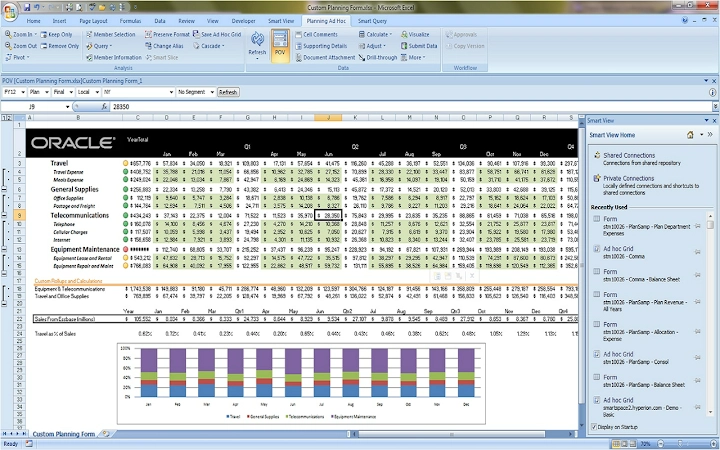
The Oracle Smart View extension is designed to bridge the gap between Oracle EPM applications and Microsoft Office documents, enabling smooth data exchange between browser-based EPM tools and Office files. This tool is particularly useful for users who frequently work with Oracle Smart View for Office, allowing them to initiate OLAP queries and transfer reporting data without manual intervention. The extension acts as a pass-through mechanism, streamlining workflows for professionals managing financial reporting, budgeting, and data analysis tasks.
Targeted at enterprise users in finance, accounting, and business intelligence roles, the software supports seamless integration within complex data environments. It is especially beneficial for teams relying on both Oracle Smart View for Office and browser-based EPM platforms. Real-world usage scenarios include pulling live financial data from Oracle EPM into Excel spreadsheets, updating reports with real-time insights, and sharing analytical outputs across departments.
The developer, Oracle America, Inc., is a well-established provider of enterprise software solutions. While specific details about the development team are not provided, the product aligns with Oracle’s broader strategy in business performance management. The extension requires Oracle Smart View for Office to be installed locally, ensuring compatibility with existing enterprise infrastructure.
Key Features & Capabilities
- Secure Data Pass-Through – Enables bidirectional transfer of OLAP queries and reporting data between Oracle Smart View for Office and browser-based EPM applications, reducing manual data entry errors.
- Zero Configuration – Once installed, the extension operates automatically without requiring user setup or configuration, minimizing IT overhead.
- Seamless Workflow Integration – Allows users to initiate EPM actions directly from Office documents or browser sessions, improving productivity during reporting cycles.
- Compatibility with Oracle Smart View for Office – Designed specifically to work with Oracle Smart View for Office, ensuring consistent behavior across environments.
- Minimal User Interaction – Functions in the background, allowing users to focus on data analysis without interrupting their workflow.
For example, a financial analyst can open an Excel file containing Smart View data, click a button in the browser to pull updated budget figures from Oracle EPM, and instantly reflect those changes in the document. Similarly, a user can initiate a report from a browser and seamlessly embed it into an Office document without exporting or re-entering data.
User Interface, Workflow & Performance
The extension integrates directly into the browser environment, with no standalone interface or visible controls. Users interact with it indirectly through Oracle Smart View for Office and supported EPM applications. The UI is minimal, relying on background processes to manage data exchange, which reduces visual clutter and ensures a clean experience.
Navigating workflows remains intuitive, as the extension activates automatically when specific triggers are detected in Office documents or browser sessions. The workflow efficiency is enhanced by eliminating manual copy-paste steps, which can lead to data inconsistencies. However, exact performance details were not specified by the developer.
General stability is expected given the tool’s lightweight nature and passive operation. The developer did not specify resource usage details, so CPU and RAM behavior remain unknown. Based on typical browser extension patterns, the impact on system performance is likely negligible. No reported issues with crashes or hangs were mentioned in the provided information.
Compatibility & System Requirements
The Oracle Smart View extension is compatible with Windows and Mac operating systems. It supports the latest versions of major browsers, though specific browser names were not listed. The software requires Oracle Smart View for Office to be installed on the user’s machine, which serves as the foundation for all functionality.
The installation size is 50.2 MB, which is moderate for a desktop extension. No hardware requirements were specified. The developer did not provide additional system requirements, so users should ensure their systems meet the baseline needs of Oracle Smart View for Office.
Compatibility information was partially provided. Users should verify that their version of Oracle Smart View for Office is compatible with this extension, as mismatched versions could affect functionality.
Pros and Cons
Pros
- Enables seamless data transfer between Office and browser-based EPM tools
- Requires no configuration or user setup after installation
- Operates in the background with minimal system impact
- Designed for enterprise environments with strong security and compliance alignment
- Free to use, reducing adoption barriers for teams
Cons
- Dependent on Oracle Smart View for Office being installed
- Limited to users already within the Oracle EPM ecosystem
- No visible interface or user controls for troubleshooting
- Exact browser compatibility details not disclosed
- Performance and resource usage data not provided
FAQ Section
Is the Oracle Smart View extension free to use?
Yes, the extension is available at no cost. It is distributed under a license that permits personal, noncommercial use.
Which operating systems does the extension support?
The extension is compatible with Windows and Mac operating systems.
Do I need to install Oracle Smart View for Office separately?
Yes, Oracle Smart View for Office must be installed on the user’s machine for the extension to function properly.
Can I use this extension offline?
Yes, once installed and configured, the extension can operate without an internet connection, provided that Oracle Smart View for Office is already set up and accessible locally.
What happens if I update Oracle Smart View for Office?
Updates to Oracle Smart View for Office may affect compatibility with the extension. Users should ensure both components are updated to matching versions for optimal performance.
Final Thoughts
The Oracle Smart View extension delivers a focused, reliable solution for professionals working within Oracle EPM and Microsoft Office environments. Its ability to automate data exchange between browser and Office applications significantly reduces manual effort and enhances reporting accuracy. The zero-configuration design and free access make it an attractive option for enterprise teams seeking seamless integration.
While it lacks visibility and detailed system specifications, its targeted functionality and strong alignment with existing enterprise tools outweigh these limitations. The extension is ideal for finance and reporting teams that rely on Oracle Smart View for Office and need consistent data synchronization across platforms.
Download Oracle Smart View extension now







